High volume phishing campaign uses Microsoft 365 outage lures to target multiple industry sectors
Microsoft has identified a coordinated phishing campaign exploiting the recent Microsoft 365 outage to target organizations worldwide, using fake service notifications to steal credentials.
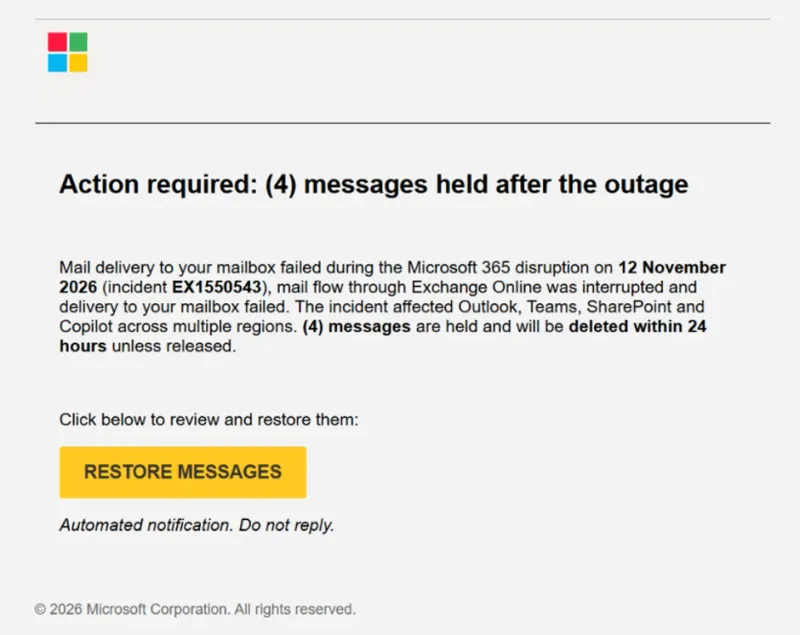
On November 13, 2026, Microsoft Threat Intelligence observed a coordinated, high-volume phishing campaign targeting organizations across multiple sectors worldwide. The threat actors used phishing emails disguised as legitimate Microsoft 365 service-health notifications to lure recipients into clicking a malicious link.
The messages created a false sense of urgency by claiming that emails had been held during a service disruption and would be deleted within 24 hours unless the recipient took action to restore them. This approach follows historical attacker campaigns that exploit notable global events in their social engineering lures.
Attack techniques
Microsoft identified the threat actor's use of specific sender domain names, including moments-notice[.]com, planetmaison[.]com and newbooker[.]com. The campaign used randomized outage subjects like "Outage – aF7vG6" and display names such as "MSF Outage Notification" or "AMZ Service Health" to appear legitimate.
The emails employed recipient-specific tracking links that led to reallifeaccounting[.]com or reallifeaccounting[.]com/themelist0.html. No QR codes or malware attachments were observed, but the off-brand destination and Microsoft 365 impersonation suggest credential theft was the likely objective.
Attack chain
The attack chain begins with delivery of emails from suspicious domains, followed by impersonation of Microsoft 365 service notifications. The social engineering tactic creates urgency by claiming messages will be deleted, prompting recipients to click "RESTORE MESSAGES" or "TAKE ACTION."
The activity used distinct sender domains, including: moments-notice[.]com, planetmaison[.]com and newbooker[.]com. The messages also used email-delivery and link-tracking infrastructure to generate recipient-specific URLs.
Mitigation guidance
Microsoft Defender for Office 365 blocks and quarantines phishing emails from this campaign. Organizations should search for and remove phishing messages using observed sender domains, display names, subject patterns, and destination URLs.
For users who clicked campaign links, organizations should reset credentials, revoke active sessions, and verify multifactor authentication. Security teams should block or closely monitor reallifeaccounting[.]com while investigating the attack.
Microsoft recommends ongoing hardening measures including requiring multifactor authentication, enabling Zero-hour auto purge, and using Attack simulation training to help users recognize similar phishing attempts. Security Copilot customers can use prebuilt promptbooks to automate incident response tasks.
Related
