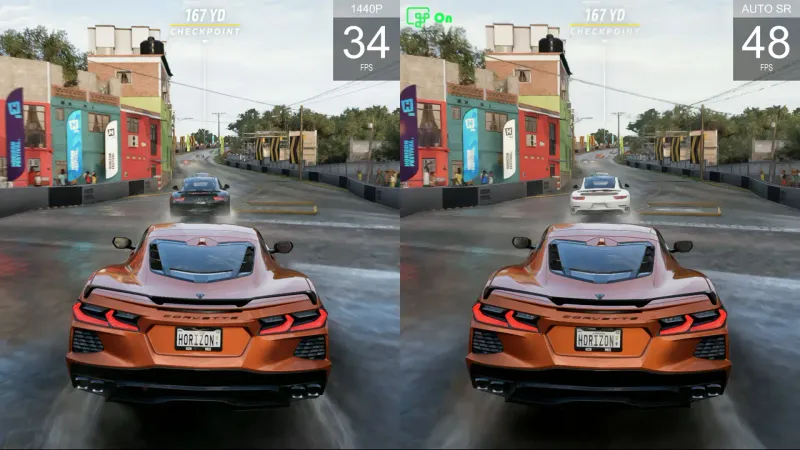
Microsoft has launched the final version of Auto SR as a system-wide alternative to DLSS for AMD Ryzen chips. - GameGPU
Microsoft has released the final version of its Automatic Super Resolution (Auto SR) technology, a system-wide alternative to DLSS, now available on ASUS ROG Ally consoles and Copilot+ PCs with AMD Ryzen AI processors.
Microsoft has officially moved its Automatic Super Resolution (Auto SR) system-level intelligent image scaling technology out of preliminary benchmarking status. The final version serves as a universal system-level alternative to classic DLSS upscaling, now fully available on ASUS portable gaming consoles ROG Ally X and ROG Ally X20, as well as on Copilot+ PCs running AMD Ryzen AI processors.
Technical Improvements
The main technical change in the release build is the ability to activate Auto SR directly on the built-in screen of portable consoles when running on battery power. During beta testing, the technology only worked when connected to a dock or external display. Developers have also added support for a base resolution of 1080p, eliminating the need to reduce resolution to 720p or 800p in game settings.
The update includes full compatibility with the Auto HDR feature, which was previously blocked when neural upscaling was enabled. Algorithm calculations are performed directly on the integrated neural processing unit (NPU), improving image clarity and frame rates in DirectX 10, 11, and 12 titles without straining the graphics core or requiring developer support.
Performance Boost
Along with the release, Microsoft introduced a new Performance Mode profile, increasing the frame rate cap from 75 FPS to 120 FPS for smoother competitive gaming. Internal benchmarks in Rocket League on ROG Ally X at 720p with high graphics settings showed the standard Quality mode delivers 70 FPS, while Performance mode increases this to 115 FPS—a 64% performance boost.
Support for the built-in display and 1080p resolution is available after updating the Auto Super Resolution Package via Microsoft Store and Game Bar applications. The 120 FPS profile and Auto HDR support are accessible through current Windows 11 cumulative update packages.
Related
