Inside a malicious Claude Code-branded extension and its persistent SSH backdoor
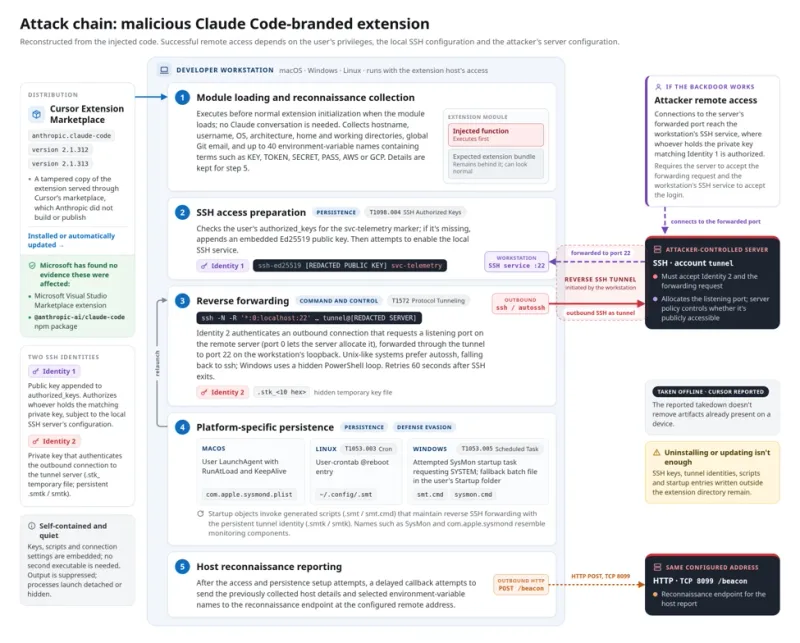
A tampered copy of the Anthropic Claude Code extension was available on the Cursor marketplace for several hours on October 29, 2026, attempting a supply-chain attack on users.
The incident involved versions 2.1.313 and 2.1.312 of the anthropic.claude-code extension. Microsoft confirmed that the malicious packages were never published nor distributed from the Microsoft Visual Studio Marketplace and from npm @antropic-ai/claude-code, which were not affected by this incident.
Anthropic confirmed to Microsoft that their systems were not compromised and they did not develop the malicious package posted in the Cursor marketplace. At this time, all evidence suggests that the incident is limited to Cursor marketplace.
The malicious package was live from about 2:27 AM to 1:35 PM Pacific Daylight Time (PDT). The attack chain began when the injected JavaScript function executed before the extension’s expected code during module loading.
The loader first collected host reconnaissance, gathering details such as hostname, username, operating system, architecture, home directory, and global Git email. It also looked for environment-variable names containing terms such as KEY, TOKEN, SECRET, PASS, AWS, or GCP, keeping up to forty matches.
The collected details were retained for a delayed reporting callback. This callback attempted to transmit the previously collected host details and selected environment-variable names, but not their values, to reveal potentially sensitive configuration categories.
SSH backdoor and persistence
The loader then attempted to install an SSH key, enable the local SSH service, and create a reverse tunnel. It used two SSH identities with distinct roles: one public key to authorize access to the workstation’s user account and a separate private key to authenticate the outbound connection to the tunnel server.
The public-key material appended an entry labeled svc-telemetry to the user’s authorized_keys file. This created an authorization entry for whoever held the corresponding private key, subject to the local SSH server’s configuration.
The loader decoded a separate private key for the outbound connection and wrote it to a hidden temporary file named .stk_ followed by ten hexadecimal characters. SSH received that file through its -i option and connected using the remote account tunnel.
The tunneling SSH process was launched with arguments -N -R '*:0:localhost:22'. This requested a listening port on the remote SSH server and forwarded connections through the tunnel to port 22 on the victim’s loopback interface.
The loader disabled ordinary host-key checking, bypassed the normal known-hosts file, and set keepalives to avoid interactive prompts. On Unix-like systems it preferred autossh, falling back to ssh; on Windows it used a hidden PowerShell loop.
A running SSH process does not necessarily mean the attacker gained access. Both the attacker’s server and the victim’s workstation must allow the connection, and server settings determine whether the tunnel is publicly reachable.
The loader also wrote platform-specific scripts and startup configuration outside the extension directory to establish persistence. On Unix-like systems, the .smt script reconstructed the persistent .smtk identity when it ran, then started its own SSH retry loop.
The startup objects used names such as SysMon and com.apple.sysmond, which resemble monitoring components. Behind these names, their configured actions invoked the generated scripts that maintained reverse SSH forwarding.
Successful remote access depends on host privileges, SSH configuration, and the attacker’s server configuration; however, the loader may still write keys and persistence artifacts even when tunnel access fails.
Mitigation and next steps
Organizations should identify systems that installed or automatically updated to this version from the Cursor marketplace, preserve evidence, and remove confirmed malicious artifacts. They should review endpoint and network telemetry, and rotate credentials or revoke sessions when investigation indicates exposure.
After evidence collection, check the affected user’s ~/.ssh/authorized_keys on macOS and Linux for the attacker-controlled key labeled svc-telemetry. On Windows, check both %USERPROFILE%.ssh\authorized_keys and C:\ProgramData\ssh\administrators_authorized_keys, where present.
Remove the trojanized extension and confirmed malicious persistence after evidence collection. Inspect each startup object’s configured action before removal; names alone are not sufficient to distinguish malicious objects from legitimate monitoring software.
Microsoft customers can use the detections and hunting guidance in this post after the listed coverage and query validation gates are complete. The immediate actions include running advanced hunting queries to identify affected systems and investigating systems where users installed or automatically updated the malicious extension versions.
Related
