Microsoft 365 Token-Replay Attacks Compromise 97 Accounts at 79 Organizations
Cybersecurity researchers have disclosed a Microsoft 365 campaign leveraging adversary-in-the-middle relays to compromise 97 accounts at 79 organizations.
Cybersecurity researchers have disclosed a Microsoft 365 campaign that has been observed leveraging an adversary-in-the-middle (AitM) relay to capture sign-in sessions and then replay the stolen tokens to break into email accounts at 79 organizations. Huntress, which observed the activity between July 14 and September 22, 2026, said it detected 497 successful Microsoft 365 sign-in events across the victim organizations from over 200,000 login attempts.
The attackers ultimately compromised 97 accounts and registered 48 rogue Entra devices. Rather than guessing passwords, the attacker replayed sign-in tokens stolen from victims, and researchers have traced more than 200,000 failed login attempts from the campaign window back to the 193.26.115[.]0/24 IP range.
Token Replay Method
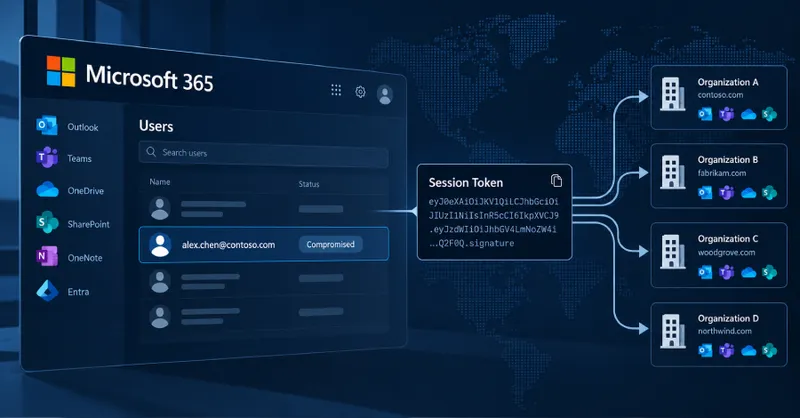
The attack has been found to employ an AitM login page, which sits between the victims and legitimate Microsoft infrastructure to capture the entered credentials and MFA codes and relay the information to the real login page. The end goal is to collect the access token issued by Microsoft following the sign-in process so that it doesn't have to bypass MFA a second time.
The "proof of login" token is subsequently replayed by the attacker from their own devices within minutes to conduct automated sign-in attempts against Microsoft 365 services. The approach has been codenamed token spraying, as it involves the attacker replaying many stolen tokens at scale across several organizations in a manner that's analogous to password spraying.
Rather than guessing passwords, the attacker replayed sign-in tokens stolen from victims, and we've traced more than 200,000 failed login attempts from the campaign window back to the 193.26.115[.]0/24 IP range.
Persistence Tactics
Upon gaining successful access, the attackers moved to add their own authenticator app as a form of persistence to complete MFA challenges for new sign-ins and overcome scenarios where the stolen session token expires or gets revoked by the victim. In no less than 19 organizations, the victim's existing MFA methods were removed and a new method registered within three hours of the first sign-in.
In one case observed on July 21, 2026, the threat actors activated a new authenticator app named "iPhone 13" less than 51 minutes after the session was hijacked. Rogue devices served the same purpose, with the threat actor registering at least 48 fake computers in victim organizations' Microsoft directories.
A registered device can give the attacker a more durable way to request tokens than the stolen session alone, and it stays in the directory until someone deletes it. Furthermore, the attackers have also been spotted setting up hidden email rules in victims' inboxes with names such as ".," "sss," "ss," "iT," ",.," "........," "s," and "d" to delete incoming mail with certain keywords referencing payroll, deposit, and bonus.
Attack Origin
The campaign was first observed from a Romanian IP address "193.26.115[.]221," which, according to VirusTotal, is used by a remote access trojan called AsyncRAT. The IP address is associated with a German hosting provider named 1337 Services GmbH. Data from GreyNoise currently lists 29 IP addresses matching the hosting provider, out of which 10 have been flagged as malicious and five are marked suspicious.
The entity is linked to StarkRDP and rdp[.]sh, which allows paying customers to rent virtual servers. The domains linked to both StarkRDP and rdp[.]sh were taken down, alongside websites for Nulled, Cracked, and Sellix, as part of an international law enforcement operation dubbed Talent in January 2025. As of writing, the two platforms are operational, with the former now rebranded as exy[.]sh.
Mitigation Recommendations
Organizations who suspect a token replay compromise are recommended to revoke sessions and reset the password, audit Entra devices, review MFA methods, check for unexpected inbox rules or new enterprise applications, and restrict device-code workflow with Conditional Access policies.
Conditional Access Policies (CAP) can help fill some of the security gaps that MFA can't, as long as they're appropriately implemented. Businesses setting up CAPs should require MFA (or block) for All Users, All Cloud Apps, and All Client App types, unconditionally.
The tokens originate from multiple sources, including AitM relays behind fake sign-in pages, device-code phishing, and social engineering during a legitimate login process. In one compromised mailbox, the email rule marked all incoming messages as read and deleted them before the mailbox was used to send outbound spam to hundreds of external recipients.
Related
