New MSI Afterburner Plugin Brings 28 Thermal Grizzly WireView Pro II Sensors To Your In-Game Overlay, Including Individual 12V-2×6 Pin Monitoring. - Wccftech
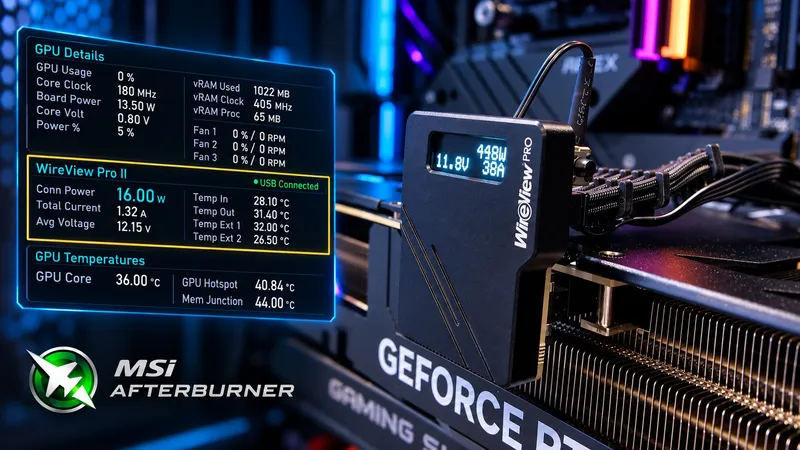
A community developer has released an open-source plugin for MSI Afterburner that enables users to monitor 28 different sensors from the Thermal Grizzly WireView Pro II device directly through an in-game overlay.
The ongoing issues with melting 16-pin power connectors on NVIDIA's GeForce RTX 40 and RTX 50 Series GPUs have prompted the need for better monitoring solutions. The new plugin developed by Reddit user VolterMort allows users to track detailed power delivery information without installing additional background applications.
The tool communicates directly with the WireView Pro II hardware over USB, exposing a wide range of measurements. Users can view total connector power consumption, current, and average voltage, along with individual voltage, current, and power readings for all six 12V pins.
The plugin also provides internal and external temperature sensor readings, cooling fan duty cycle, cable power rating, and device connection status. This functionality is particularly useful for gamers and system builders who want to ensure their power delivery is stable during intensive workloads.
VolterMort has successfully tested the plugin on Windows 11 Pro with MSI Afterburner 4.6.7 Beta 2 and a WireView Pro II Black Reversed running firmware v05. The developer notes that compatibility with other configurations remains unverified.
The plugin polls the hardware approximately once per second and offers a Pause/Resume USB feature. This allows users to switch between the plugin and Thermal Grizzly's official software without restarting Afterburner, making it a flexible addition to any power monitoring setup.
It is important to note that the plugin itself does not provide automatic protection against connector melting or adjust GPU power limits. It is strictly a monitoring solution, with the underlying WireView hardware retaining its independent protection functionality.
The plugin is available for free under the MIT license, with its source code and ready-to-use DLL accessible through GitHub. Users simply need to place the DLL inside Afterburner's monitoring plugins folder and enable their preferred sensors through the application's Monitoring settings.
Related
